Track time.
Don't waste it.
Log work as you go and submit with one click to Odoo or Teamwork. The only way to avoid the Friday headache.

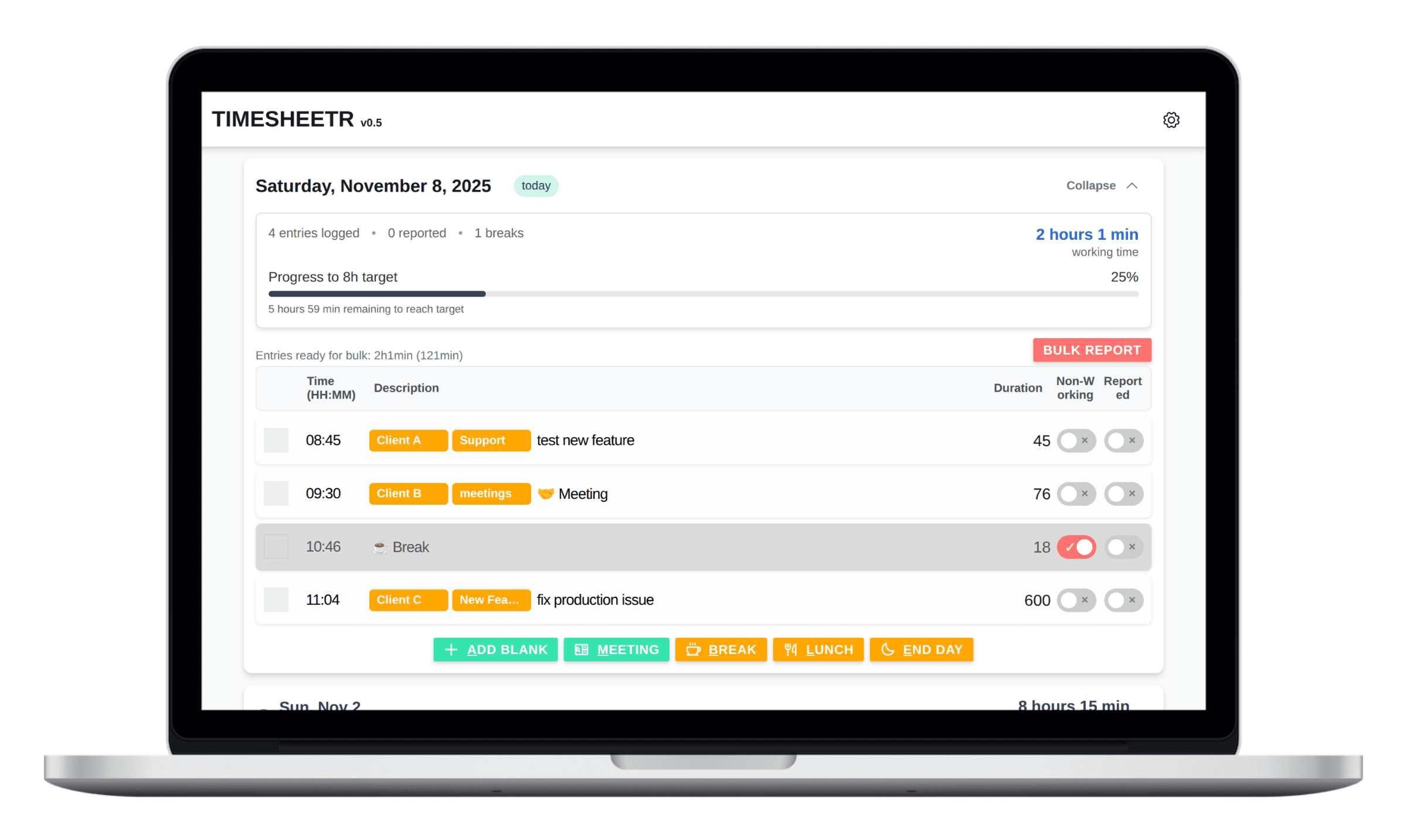
How It Works
Timesheets are fun for no one. They get painful when you leave them for later,
or when tracking your day as you work takes too much effort without the right
tool.
Timesheeter fixes both problems.
Start your day
Open Timesheeter and begin your first task with a single shortcut. Your timer starts immediately and your day begins without any setup or friction.
Switch tasks instantly
Move to the next task and hit one key or use a shortcut. Timesheeter records the new entry, calculates the time spent, and keeps everything organized. You stay focused on your work while your timesheet builds itself.
End your day, not your week
When your day ends, your timesheet is already complete. Submit everything to Odoo or Teamwork in one click, or keep it in local mode. No reconstruction, no digging through your memory, no Friday headache.
Track your day effortlessly.
Stay focused on your work.
Smart, focused features that stay out of your way. Track time, switch tasks, manage projects, and report your work with minimal effort.
Time spent calculated automatically
Timesheeter automatically computes the duration between entries and updates the latest one in real time. You start a task, switch tasks, and the math happens for you. No manual adjustments, no errors, and no wasted minutes figuring out what you worked on. Select multiple tasks as see the total time spent on them.
Keyboard shortcuts and quick-add buttons
Add entries instantly with single-keystroke shortcuts or quick-add buttons. Switch tasks, create meetings or breaks, and log work without stopping your flow. Fewer clicks, fewer interruptions, and a much smoother time tracking experience across your entire day.
Automatic 15-minute rounding
Timesheeter rounds reported time to the nearest 15-minute increment, matching common billing rules used by consultants and freelancers. You still see the exact duration in the app, but your reports stay clean, consistent, and client-friendly with no extra effort.
One-click bulk reporting
Submit all your selected entries in a single action. Timesheeter groups them by project and task, then sends them to Odoo or Teamwork in one clean batch. Perfect for finishing a full day or week of reporting in seconds instead of minutes.
Fast project and task tagging
Assign projects and tasks without breaking your focus. Start typing and autocomplete finds the right item from Odoo, Teamwork, or your manual list. Create new ones on the fly. Everything stays organized and searchable with almost no manual work.
Link entries to avoid typing twice
Stop retyping the same task descriptions. Link an entry to another one from the same day and Timesheeter reuses the description, project and task automatically. Ideal for recurring or interrupted tasks, follow-ups, or multi-part work. Keeps your day tidy and your descriptions consistent.
Clear daily progress tracking
See exactly how your day is progressing. The daily summary shows total working time, target hours, breaks, reported entries, and remaining time. A simple progress bar keeps you aware of your goals so you stay on track without checking the clock.
Multi-device sync
Enable cloud sync to keep your timesheets updated across phone, laptop, and tablet. Start your day on your computer, log tasks on the go, and finish anywhere. Perfect for commuters, field workers, and anyone who switches devices during the day.
Advanced privacy controls
You decide what gets synced. Keep everything local for maximum privacy, or enable cloud sync for connectors, settings, or timesheets. Local mode stores all data on your device with no external servers. Your workflow, your data, your rules.
1 min
To start tracking your first task
100%
In control. Local mode or cloud sync, your choice
1 click
To submit to Odoo or Teamwork
Trusted by thousands of monthly visitors
Trusted workflow for
freelancers and teams
Designed to remove the frustration from daily time tracking.
"Timesheeter changed how I bill clients. I went from guessing hours to having exact records. My income increased 30% just from accurate tracking."

Mike Chen
Freelance Designer
"We tried 5 different time trackers. Timesheeter is the only one my team actually uses. It's that simple and that good."

Marcus Rodriguez
Agency Owner
"Finally, a time tracker that doesn't feel like homework. I track everything now, and my productivity has never been clearer."

Steve Watson
Software Developer
Full Transparency:
We’re still early, but the feedback from our first users has been incredibly positive. The examples above are illustrative of what we’re hearing so far. They’re not real testimonials yet, but they do reflect genuine reactions.
Local or Cloud?
Start in local mode for full privacy, or upgrade for cloud sync and powerful integrations.
Private & Offline
Local mode keeps everything on your device. No servers. No cloud. Free forever and works fully offline.
Sync & Integrate
Upgrade for multi-device sync and seamless integrations. Connect to Odoo or Teamwork to speed up reporting and stay aligned with your projects.
Ready to take control of your time?
Start tracking in minutes and see how much simpler your days can be.
No credit card required.
Frequently Asked Questions
Short answers to help you get started
Is it really free?
Yes! The 'Free & Local' plan is completely free, forever. It includes all our core time tracking features and stores your data privately in your browser. You only pay if you want cloud sync or integrations.
What's the $9 lifetime deal?
A one-time payment unlocks Odoo and Teamwork integrations, plus multi-device sync. It’s a solo lifetime plan with access to all premium features forever.
How secure is my data?
You have two options. With the Free & Local plan, your data stays on your device and never leaves your browser. Paid plans include cloud sync, which you can enable if you want to access your data from multiple devices. Cloud sync is always optional. We are GDPR compliant and never sell or access your data.
Does it work offline?
Yes. You can track time with no internet connection and no setup. All data is saved automatically in your browser.